Built for Clinics & Healthcare Providers

Your Patients Deserve Better Than
a Crowded Waiting Room.

Patient scans QR → gets a live token → tracks their turn from their phone. Reception stops being interrupted every 2 minutes. QueFlow brings calm, digital patient flow to any clinic — live in 20 minutes.

Trusted by healthcare providers
🦷 Dental Clinics 🏥 OP & Multi-doctor Clinics 🧬 Diagnostic Centres 🌸 Fertility Clinics 🏨 Small Hospitals
↓ 60%
Wait Time Cut
Reduce perceived wait time with live queue visibility
100%
Paperless
Zero paper tokens — fully digital from day one
Live
Real-Time
Instant queue updates via WebSocket — no refresh needed
20 min
To Go Live
Register, configure & issue your first token in minutes
See It in Action

Three screens. One calm clinic.

Reception, patients, and doctors each get a purpose-built interface — here's what they see in real time.

🎫
Reception Desk
P-042 Priya R. Called
P-043 Rajan M. Waiting
P-044 Anita S. Waiting
P-045 Suresh K. Waiting
+ Register New Patient
📺
Waiting Area Display
Now Serving
P-042
→ Room 3 · Dr. Meera
Up Next
P-043 P-044 P-045
👨‍⚕️
Doctor Panel
Currently Consulting
P-042
Priya R. · Fever & Cough
A-043 James M. Next
📢 Call Next
⏭ Skip
✅ Done

Designed for healthcare providers

🦷 Dental Clinics
🏥 OP & Multi-doctor Clinics
🧬 Diagnostic Centres
🌸 Fertility Clinics
🏨 Small Hospitals
👨‍⚕️ Specialist Centres
The Problem

Every clinic reception fights the same daily chaos

Your receptionist is doing their best — but the system is working against them.

😣

Patients Crowd the Counter Asking “How Much Longer?”

No live visibility means constant interruptions. Patients get anxious, leave, or miss their turn — creating more chaos at the desk.

📋

Paper Slips, Shouting Names, Repeated Calls

Staff hand out paper tokens, shout across a crowded waiting room, then call again when someone doesn’t respond — unprofessional and exhausting.

🔔

Doctor Has to Buzz Reception Just to Know Who’s Next

Every interruption breaks clinical focus. Doctors waste minutes coordinating with front desk instead of seeing patients.

😕

Walk-ins and Appointments Compete With Zero Order

Without a clear system, urgent patients get mixed with scheduled ones, priorities get missed, and everyone is frustrated.

How It Works

From arrival to consultation — completely smooth

QueFlow connects reception, patients, doctors, and the waiting area display into one calm, automated patient flow.

1
📲

Patient Scans QR

Scans the QR poster at reception — no app download needed

Walk-in / QR
2
🎫

Live Token Issued

Instant digital token — e.g. P-042 — with estimated wait time

Auto-numbered
3
📱

Patient Waits Calmly

Tracks live queue position on their phone — no crowding the counter

Live position
4
📢

Doctor Calls Next

Display shows: "P-042 — Please go to Room 3"

Doctor panel
5

Seen & Done

Doctor marks complete. Queue auto-advances. Zero front-desk calls.

Zero interruptions

‹ Swipe to explore all 5 steps ›

Platform Overview

One platform. Reception, doctors & patients — all connected.

Reception registers a patient — in milliseconds, the display screen, doctor panel, and patient’s phone all update automatically. No phone calls, no shouting.
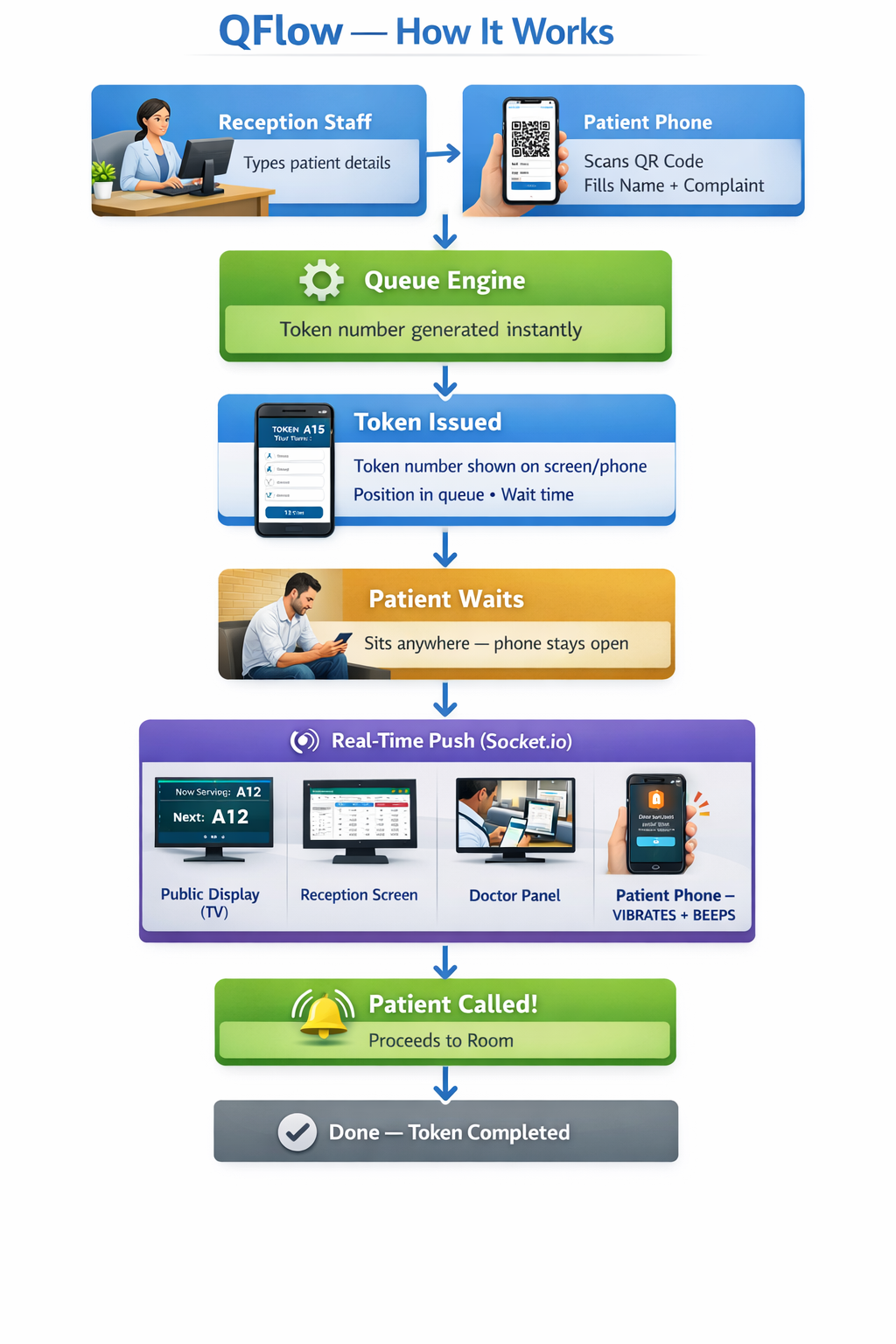
QFlow — End-to-End Queue Flow
Who It’s For

Three roles, one seamless clinic system

Reception, doctors, and patients — each gets exactly the interface they need. No training required.

🖥️ Reception Desk

Patient registration & intake

  • Register a patient in under 30 seconds
  • Assign doctor, room & priority instantly
  • Mark tokens Urgent for emergency cases
  • Cancel, reschedule, or transfer any token
  • Live overview of all doctor queues simultaneously

👨‍⚕️ Doctors & Specialists

Consultation rooms & panels

  • See their personal patient queue live on any device
  • Call next patient with a single tap
  • Mark patients seen, skipped, or no-show
  • Start a timed break — queue pauses automatically
  • Full autonomy — no need to call reception

🧑 Patients & Visitors

Self-service & live tracking

  • Scan QR code — no app download needed
  • Self-register with name & chief complaint
  • See live queue position on their phone
  • Display shows exactly which room to go to
  • No more crowding the counter asking “how long?”
Features

Everything a clinic needs to run smoothly

Built around the real daily workflow of clinic receptions, doctors, and patients.

📲

QR Patient Token — No App Needed

Print a QR code per department. Patients scan with any phone camera, enter their name, and instantly get a live token. Zero app download, zero counter crowding.

👨‍⚕️

Doctor & Operator Panel

Each doctor sees only their own patient queue. One tap to call next, mark done, or skip. No more buzzing reception to ask who’s next.

📺

Live Waiting Area Display

Connect any TV or monitor. “Now Serving” and “Up Next” tokens shown in real time — with room/doctor name. No login needed on the screen.

🚨

Urgent Patient Escalation

Mark any patient as Urgent and they move to the front of the queue immediately — without disrupting the flow for others. One click.

📊

Daily Reports & Analytics

Track patients served, average wait times, no-shows, and doctor performance daily. Identify bottlenecks and make informed staffing decisions.

🔧

API & System Integration

Already using an HIS or practice management system? QueFlow connects via a clean API. Tokens can be auto-created — zero double entry at reception.

Works for Every Clinic Size

From solo practitioner to multi-department hospital

Start with one doctor. Expand to your entire clinic. Scale without switching platforms.

Solo Practice

Single Doctor Clinic

  • 1 doctor, 1 receptionist
  • QR token at reception or entrance
  • One waiting area display
  • Doctor panel on phone or tablet
Growing Clinic

Multi-Doctor / Multi-Dept Clinic

  • 3–10 doctors, each with their own queue
  • Department-filtered display screens
  • Dental, General, Specialist — all together
  • Per-doctor performance reports
Large Facility

Diagnostic Centre / Hospital

  • Multiple departments & lab counters
  • Walk-in + appointment flow together
  • API integration with existing HIS
  • Audit logs & advanced reporting
Simple Pricing

Plans for every clinic size

Start free. Upgrade when you’re ready. No hidden fees, no long-term contracts.

Before vs After

The difference from day one

See exactly what changes the moment your clinic goes live on QueFlow.

❌  Without QueFlow
Paper tokens handed out at the counter
Staff shout patient names across the waiting room
Patients crowd reception asking “how much longer?”
Doctor buzzes reception just to know who’s next
No-shows go untracked, doctor sits idle
No data on wait times or patient throughput
Urgent cases handled by instinct, not process
✅  With QueFlow
Patient scans QR — token issued in seconds, no crowding
Display screen shows token & room name clearly
Live queue position on patient’s phone — calm waiting
Doctor calls next with one tap — fully autonomous
No-shows marked instantly, queue auto-advances
Daily reports on wait times, throughput & doctor stats
One-tap Urgent flag moves patient to the front
Trusted by clinics

What clinic teams say

Real feedback from dental clinics, diagnostic centres, and multi-doctor practices using QueFlow every day.

★★★★★

"Before QueFlow, patients would crowd the counter asking 'how much longer?' Now the display answers that for us. We handle 80+ tokens a day with two staff — and no shouting."

PS
Priya Sharma
Receptionist · Multi-specialty Clinic, Mumbai
Healthcare
★★★★★

"We replaced a ₹2L hardware token system with QueFlow running on a tablet. Setup took 15 minutes. Customers scan the QR poster and wait from the coffee shop next door."

RK
Rajesh Khandelwal
Branch Manager · Cooperative Bank, Jaipur
Banking
★★★★☆

"The biggest win was transferring tokens between counters without losing the person's place. Earlier that meant starting over. Complaints dropped by half in the first month."

AM
Anitha Murugan
Section Officer · Taluk Office, Coimbatore
Government
★★★★★

"I'm a solo practitioner with one assistant. The doctor panel lets me call the next patient with one tap between appointments. No buzzer, no intercom — just works."

DV
Dr. Vikram Das
Owner · Smile Dental Care, Bengaluru
Healthcare
★★★★☆

"Saturday rush used to be chaos — 40 walk-ins, no system. Now they scan, get a token, and browse while waiting. Average wait dropped from 25 to 12 minutes."

FN
Farheen Naqvi
Store Lead · Telecom Retail, Hyderabad
Retail
★★★★★

"Patients get a phone notification when it's almost their turn. They don't need to install anything — it just works in the browser. That was the selling point for us."

SK
Dr. Sneha Kulkarni
Lab Director · Diagnostics Centre, Pune
Healthcare
FAQ

Common questions from clinic teams

Everything you need to know before going live with QueFlow in your clinic.

Yes. QueFlow supports both walk-in and appointment flows simultaneously. Receptionists can register scheduled patients alongside walk-ins, and the queue handles both with the correct priority order.
Yes. Each doctor or specialist gets their own individual queue and panel. When reception registers a patient, they assign them to the correct doctor. The doctor sees only their own patients — no confusion between rooms.
No app needed. Patients scan a QR code with their phone’s built-in camera and immediately see their live queue position in a browser. Nothing to install — works on any smartphone.
Yes. Reception, doctors, and admins all work from a browser — phone, tablet, or desktop. The display screen works on any TV or monitor with a browser. No dedicated hardware required.
Open the display URL on any browser connected to a TV or monitor. It shows “Now Serving” and “Up Next” patient tokens with room and doctor name in real time — no login, no refresh needed.
Yes. Create as many departments, rooms, and doctors as needed. Each doctor sees only their own queue. Display screens can be filtered per department. Scales from one GP to a full multi-specialty hospital.
Around 20 minutes. Create your clinic, add doctors and departments using the Healthcare template, invite staff with a link, then open the display URL on your TV. We also offer free onboarding assistance via WhatsApp.
Yes. QueFlow includes a free trial so you can run a complete patient queue for your clinic and evaluate the platform fully. Upgrade to a paid plan at any time as your needs grow.
All data is encrypted in transit. Each clinic’s data is fully isolated — staff can only see their own organisation’s queue. No patient data is shared with third parties.
"

We were managing three counters with printed tokens and a whiteboard. The first week on QueFlow, our average service time dropped by 20% — simply because operators weren't losing time asking who's next.

💼
Arun Krishnamurthy
Branch Operations Manager · Regional Bank
Quick Setup

Your clinic is live in under 20 minutes

No hardware to install. No IT team needed. No training programme. Your reception and doctors are operational today.

🏥
1

Set Up Your Clinic

Enter clinic name, add your doctors and departments. Use the Healthcare preset template — ready in 2 minutes. No technical knowledge needed.

👨‍⚕️
2

Add Doctors & Reception Staff

Create logins for reception and each doctor. They sign in from any browser on their phone or tablet. No app download, no install.

🚀
3

Go Live Today

Open the display URL on your waiting area TV. Print the QR codes. Start registering patients. Your clinic is running QueFlow.

Get in Touch

We're here to help

We respond within one business day. Choose the right topic and your message goes directly to the right person.

Prefer a call? Reach us at +91 96004 24184  ·  Mon–Sat, 9 am–7 pm IST

Ready to transform your clinic’s waiting room?

Join dental clinics, fertility centres, diagnostic labs, and multi-doctor practices already using QueFlow to reduce reception chaos.